POTATOTECH is currently in pre-launch. Product information and repair guides are available to browse. Online ordering and payment are not yet available.

How to Fix an Overheating PS4 or Xbox One in South Africa (2026)

Game consoles are built for performance, not ventilation. In South Africa’s climate—with summer temperatures regularly exceeding 30°C and power outages causing rapid thermal cycling—overheating is one of the most common causes of console failure. This guide shows you exactly how to diagnose and fix an overheating PS4 or Xbox One before permanent damage occurs.

Key Takeaways

  • SA’s combination of high ambient temperatures and load shedding cycles accelerates console overheating by 40-60% compared to controlled environments
  • Most overheating issues can be fixed DIY with basic tools—fan cleaning and thermal paste replacement are standard maintenance, not repairs
  • If your console has burned components or melted plastic, stop DIY and seek professional help immediately

Why Game Consoles Overheat in South Africa

Game consoles generate significant heat during operation—especially during graphically intensive gaming sessions. The problem in South Africa isn’t just the heat; it’s the thermal cycling caused by load shedding and recovery.

The SA Climate Factor

South Africa’s summer temperatures regularly exceed 30°C in many regions. When your console is already running hot internally, ambient heat reduces the efficiency of the cooling system. The fan has to work harder to move air through hotter heatsinks, and the thermal gradient between your console and the surrounding air decreases.

Load Shedding Thermal Cycling

Every time power cuts and returns, your console undergoes rapid thermal expansion and contraction. Components that are hot contract suddenly when power dies, then expand again when the PSU kicks back on. This cycling stresses solder joints, degrades thermal paste performance, and can crack PCB traces over time.

Over months and years, this thermal fatigue compounds—what started as normal operating temperature gradually shifts higher as cooling efficiency degrades.

Signs Your Console Is Overheating

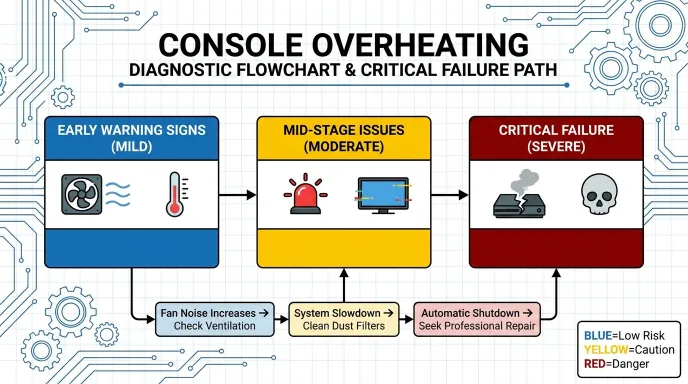
Before attempting any repair, confirm the overheating diagnosis. These signs progress from nuisance to critical:

Early Warning Signs

  • The fan runs louder than usual or at higher RPM during normal use
  • Console shuts down after 30-60 minutes of gaming (thermal protection trigger)
  • Game frames drop or stutter during intensive scenes
  • Exterior casing feels excessively hot to touch

Critical Signs—Stop Using Immediately

  • Burning smell—this indicates overheating components or melting insulation
  • Grid lines or artifacts on screen—GPU thermal throttling or failure
  • Yellow or red light on Xbox One power button
  • Blue screen of death on PS4 (usually thermal-related)

How to Fix an Overheating PS4

The PS4 has a relatively straightforward cooling system. Most overheating issues stem from dust-clogged heatsinks or degraded thermal paste on the CPU and GPU.
Tools You’ll Need

  • Phillips head screwdriver set (TS7 for PS4 models)
  • Compressed air can or manual blower
  • Isopropyl alcohol (90%+)
  • Thermal paste (Arctic MX-4 or equivalent)
  • Soft brushes for dust removal

Step-by-Step: PS4 Fan Cleaning

  • Power down and unplug—wait 15 minutes for components to cool
  • Remove bottom screws—PS4 models vary; consult iFixit guides for your specific revision
  • Disconnect fan cable from motherboard before removing
  • Remove heatsink assembly—typically 4-6 screws holding the thermal module
  • Clean old thermal paste—use isopropyl alcohol on lint-free cloth, clean both CPU/GPU surfaces and heatsink base
  • Apply new thermal paste—pea-sized dollop in the centre; let compression spread it
  • Reassemble in reverse order—ensure all screws are snug but don’t overtighten
CONSOLE OVERHEATING

How to Fix an Overheating Xbox One

The Xbox One shares similar cooling challenges with the PS4 but has some design differences that affect the repair approach.

Xbox One vs PS4: Cooling Differences

The Xbox One’s cooling system is more enclosed than the PS4’s. The fan assembly is harder to access, and the thermal paste application requires more care due to the console’s tighter component spacing. However, the basic principle remains identical: clean the heatsink, replace degraded thermal paste, and ensure proper airflow.

One Xbox-specific concern: the Original Xbox One (not Slim or X models) had known cooling design flaws that Microsoft addressed in later revisions. If you have the Original Xbox One, consider whether a fan upgrade kit is worthwhile alongside basic maintenance.

Xbox One Maintenance Steps

  • External cleaning first—use compressed air on ventilation slots before opening
  • Remove top cover—Xbox One uses different fasteners than the PS4.
  • Access fan assembly—may require removing additional shrouds
  • Clean fan blades and heatsink fins—dust accumulation here is the number 1 cause of overheating
  • Replace thermal paste—same technique as PS4: clean surfaces, apply fresh paste
  • Reassemble carefully—Xbox One’s internal layout is tighter; ensure no cables are pinched

When to Stop DIY and Seek Professional Help

Most overheating issues are fixable with basic tools and patience. But some problems cross the line from maintenance into professional territory:

Safe to DIY

  • Dusty heatsinks and fans
  • Degraded thermal paste (>2 years old)
  • Blocked ventilation slots
  • Improper console placement (against wall, in enclosed space)

Professional Help Needed

  • Burnt components or discoloration on PCB
  • Melted plastic around connectors or heat sinks
  • Failed fan motor (spins unevenly or not at all)
  • GPU or CPU desoldering issues (requires reflow/reball)
  • Power supply problems (smell of burning electronics)

If you’ve attempted basic cleaning and thermal paste replacement with no improvement, or if you see any signs of component damage, seek professional repair. Continuing to run an overheating console with damaged components risks complete failure and data loss.
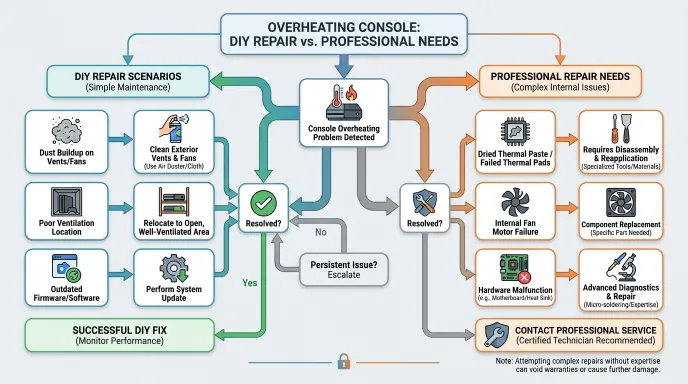
OVERHEATING CONSOLE:DIY REPAIR Vs. PROFESSIONAL NEEDS

Preventing Overheating: Long-Term Maintenance

Once you’ve fixed the immediate overheating issue, these practices help maintain cooler operating temperatures:

  • Clean every 3-6 months—dust accumulation is cumulative; regular blowing out prevents rebuild
  • Ensure adequate ventilation—keep 10cm clearance behind the console; never place in enclosed spaces
  • Avoid carpet placement—carpet fibers clog intake vents; use hard surface or stand
  • Monitor ambient temperature—if room exceeds 25°C, consider external cooling pad
  • Update firmware—Sony and Microsoft sometimes optimize fan curves in updates

FAQ: Console Overheating in South Africa

How often should I clean my console’s fan?

In South Africa’s dusty conditions, clean your console’s fan and heatsink every 3-6 months. If you live in a high-dust area or have pets, lean toward the 3-month interval. Visible dust buildup on external vents is a clear sign it’s time.

Can load shedding damage my console beyond overheating?

Yes. Beyond thermal cycling stress, power surges during restoration can damage power supplies and motherboards. Use a quality surge protector—preferably one with a joule rating >1000 and automatic shutoff. This is especially important in areas with unreliable grid recovery.

Is thermal paste replacement risky for beginners?

Thermal paste replacement is moderately risky for first-timers. The main risks are stripping screws (use the correct size), breaking fan cables, and applying too much paste. Watch iFixit or YouTube tutorials for your specific console model before attempting. If uncomfortable, a local repair shop can do this for reasonable quotes.

Why does my Xbox One shut down after 30 minutes?

This is almost certainly thermal protection triggering. The Xbox One monitors internal temperature and shuts down to prevent component damage when thresholds are exceeded. Clean the fan and heatsink, replace thermal paste, and ensure proper ventilation. If the problem persists after maintenance, the temperature sensor or fan controller may need professional attention.

Should I use a cooling pad for my console?

Console cooling pads are less effective than PC cooling pads because consoles draw air from below and expel it from the rear/side. A cooling pad can help in extreme heat, but proper ventilation clearance and clean internals are more impactful. Prioritise cleaning and placement before investing in accessories.

How much does professional console overheating repair cost in South Africa?

Professional thermal paste replacement and fan cleaning typically quoted vary by shop but generally range from R150 to R400 for basic maintenance. More complex repairs involving component replacement or reflow work can exceed R800. Always request a written quote before authorising work.

Disclaimer

This guide is for educational purposes. DIY repair carries real risk of damaging your device, and working with batteries, heat and electronics has safety implications. Always follow manufacturer guidelines where they exist, and when in doubt, hand the device to a qualified repair technician.

POTATOTECH is currently preparing its online store. Product names, specifications, pricing, stock levels and delivery options mentioned or linked above are indicative and subject to change. For the latest availability, specifications or shipping details, please contact support@potatotech.co.za. Nothing in this article constitutes a purchase offer or a commitment to supply.


Related reading: Game Console Repair: DIY vs Pro in South Africa · How to Fix Game Controller Drift in South Africa · Xbox and PS4 Controller Parts Guide
Sources & Further Reading

About This Guide

POTATOTECH publishes research-based guidance on electronics repair, replacement parts, tools and device compatibility for South African users. Our content may reference manufacturer documentation, product specifications, technical repair resources and South African market information where relevant. Where POTATOTECH has not independently tested a product or repair method, researched information is not presented as first-hand testing. About POTATOTECH: /about-us/

Important

POTATOTECH provides information about replacement parts, repair tools and device compatibility. POTATOTECH is not affiliated with or endorsed by device manufacturers unless explicitly stated. Product names, trademarks and brands belong to their respective owners. Compatibility information is provided as guidance. Always confirm the exact device model, model number and relevant part specifications before selecting or purchasing a replacement part. Repair information is provided for general informational purposes. Follow manufacturer guidance and appropriate safety precautions when carrying out repairs.

One Response

Leave a Reply

Your email address will not be published. Required fields are marked *

Related Articles

iPhone Back Glass Replacement: A Complete South African Guide (2026)

iPhone Back Glass Replacement: A Complete South African Guide (2026)

Cracked iPhone back glass? Learn DIY vs professional replacement costs in South Africa, how long it takes, and when to seek help.

iPad Screen Replacement Cost in South Africa (2026): Complete Guide

iPad Screen Replacement Cost in South Africa (2026): Complete Guide

How much does an iPad screen replacement cost in South Africa? Compare DIY vs professional repair costs for all iPad models.

How to Choose Bluetooth Headphones in South Africa (2026)

How to Choose Bluetooth Headphones in South Africa (2026)

Choosing the right Bluetooth headphones in South Africa isn’t just about picking the first pair you see. Whether you’re commuting on the Gautrain, working from home, or gaming online, the right headphones make a real difference to your experience—and your wallet. This guide breaks down what actually matters when you’re shopping for wireless headphones in […]